Assessment Success Elements
-
- Commit a couple of hours and find out if you're ready to step into a very bright future;
- Confirm that you can master foundational hard and soft skills needed for a high-growth career;
- Confirm that you can successfully complete any training or workplace activity that you set your mind to do.
Dear Applicant,
Thank you for your interest in the NCLab Career Readiness Assessment and our career training programs.
In just a couple of hours, this engaging hands-on assessment will allow you to demonstrate how effectively you learn new concepts, analyze information, solve problems, adapt to unfamiliar situations, and complete practical tasks.
Upon completing the assessment, you will earn a digital badge that recognizes your achievement and showcases your workplace readiness. It’s a credential you can proudly share on LinkedIn and with prospective employers to demonstrate that you are a quick learner, a logical thinker, a strong problem solver, and someone who has the perseverance to tackle challenging tasks and see them through to completion.
We’re excited to have you take this important first step toward your future.
---------------------------------------------------------
Taking the Career Readiness Assessment
The detailed instructions below describe the steps that you need to follow to take the assessment. The assessment takes 1 to 3 hours to complete and is best done in one session.
Do as much of the assessment as you want to do or have time to do. To come back to it later and pick up where you left off by logging in at nclab.com. Click on the LOGIN on the top menu bar and input your email address and password. Note: If you’ve forgotten your password, NCLab will provide you a new one through email.
Upon completing the assessment, you will be asked to continue your journey by scheduling a post-assessment interview in which we will review your assessment results and you will be able to ask any additional questions you may have.
PLEASE NOTE THAT THE ASSESSMENT DOES NOT DISPLAY INFORMATION PROPERLY ON SMART PHONES SO YOU MUST USE A COMPUTER OR A TABLET TO DO THE ASSESSMENT.
FIRST: Click here to open a new browser window and create an NCLab account. You’ll need to input: Your name, email address, and a password in the form. A code (“dzsxkl”) will autofill for you.
SECOND: Press the SUBMIT button and you will get an “Activate Your Account” message below the completed form, as shown below.
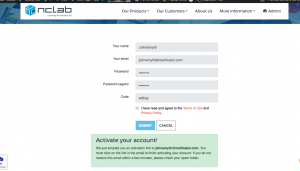
THIRD: Go to your email inbox and you should find an assessment-generated email as shown below. If you do not receive the email, it may be in your spam or junk folder. If you cannot find it, please contact support@nclab.com and we will help you complete your activation because firewalls have been known to interfere with the process.
FOURTH: Click on the “Activate Your Account Now!” link. 
FIFTH: This will open a confirmation message and clicking on it will bring you to the NCLab desktop with the NCLab Career Readiness Assessment card on it.
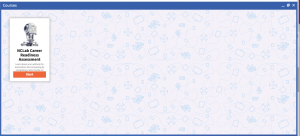
SIXTH: Click on it to begin doing your assessment. Enjoy!