Success Elements
-
- Commit approximately 30 hours and confirm that you can master skills needed for a high-growth career.
- Acquire a digital badge that you will want to add to your credentials.
- If you enjoy taking the training, you can be confident that you have what it takes to complete our full Data Analyst training program, since it uses the same engaging gamified teaching platform.
SQL Training Program
We’re excited to have you experience our FREE SQL training program. SQL is a core data handling skill that will serve you well throughout your work life, whatever career path you follow.
When you complete this program, you will be provided a digital badge that you will want to add to your credentials to show your newly acquired skill.
Earning An SQL Digital Badge
The detailed instructions below describe the steps that you need to follow to start your training. The course takes approximately 30 hours to complete.
Do as much of the course as you want to do or have time to do. Come back to it later and pick up where you left off by logging into nclab.com. Click on the LOGIN on the top menu bar and input your email address and password. Note: If you’ve forgotten your password, NCLab will provide you a new one through email.
Upon completing the course, you will be provided a digital badge and if you’ve enjoyed taking the training, you can be confident that you have what it takes to complete our full Data Analyst training program, since it uses the same engaging gamified teaching platform.
PLEASE NOTE THAT THE COURSE DOES NOT DISPLAY INFORMATION PROPERLY ON SMART PHONES SO YOU MUST USE A COMPUTER OR A TABLET TO DO THE TRAINING.
FIRST: To begin your training, click here to open a new browser window and create an NCLab account. You’ll need to input: Your name, email address, and a password in the form.
SECOND: Press the SUBMIT button and you will get an “Activate Your Account” message below the completed form, as shown below.
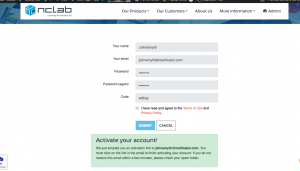
THIRD: Go to your email inbox and you should find an email as shown below. If you do not receive the email, it may be in your spam or junk folder. If you cannot find it, please contact support@nclab.com and we will help you complete your activation because firewalls have been known to interfere with the process.
FOURTH: Click on the “Activate Your Account Now!” link. 
FIFTH: This will open a confirmation message and clicking on it will bring you to the NCLab desktop with the SQL Fundamentals program card on it.

SIXTH: Click on it to begin doing your training program. Enjoy!