Assessment Success Elements
-
- Commit a couple of hours and find out if you're ready to step into a very bright future;
- Confirm that you can master foundational hard and soft skills needed for a high-growth career;
- Confirm that you can successfully complete any training or workplace activity that you set your mind to do.
Career Readiness Assessment
Thank you for your interest in the NCLab Career Readiness Assessment (CRA). We’re excited to have you experience it.
The Career Readiness Assessment (CRA) is designed to measure the core thinking, problem-solving, and work-execution skills that employers value in today’s technology-enabled workplace. Through an engaging, hands-on, gamified experience, the assessment evaluates how effectively you learn new concepts, analyze information, solve problems, adapt to unfamiliar situations, and complete practical tasks.
Should you choose to take the assessment, upon completing it, you will earn a digital badge that recognizes your achievement and showcases your workplace readiness.
Click here to open a new window to Credly, to look more closely at the digital badge.
It’s a credential you’ll want to proudly share on LinkedIn and with prospective employers to demonstrate that you are a quick learner, a logical thinker, a strong problem solver, and someone who has the perseverance to tackle challenging tasks and see them through to completion.The CRA is more than an assessment—it’s an opportunity to demonstrate your readiness for advanced training, and shows that you possess the mindset, determination, and capability needed to succeed in demanding training programs and high-growth careers.
Candidates who achieve a qualifying score are also eligible to enroll in NCLab training programs. These programs use the same proven, learn-by-doing platform featured in the assessment and are designed to help motivated learners progress from foundational knowledge to career-ready skills. No prior technical experience is required. Our programs provide the necessary foundations and guide you step-by-step toward success.
---------------------------------------------------------
Taking the Career Readiness Assessment
The detailed instructions below describe the steps that you need to follow to take the assessment. The assessment takes 1 to 3 hours to complete and is best done in one session.
Do as much of the assessment as you want to do or have time to do. To come back to it later and pick up where you left off by logging in at nclab.com. Click on the LOGIN on the top menu bar and input your email address and password. Note: If you’ve forgotten your password, NCLab will provide you a new one through email.
Upon completing the assessment, you will be asked to continue your journey by scheduling a post-assessment interview in which we will review your assessment results and you will be able to ask any additional questions you may have.
PLEASE NOTE THAT THE ASSESSMENT DOES NOT DISPLAY INFORMATION PROPERLY ON SMART PHONES SO YOU MUST USE A COMPUTER OR A TABLET TO DO THE ASSESSMENT.
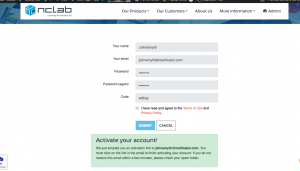
FIRST: To begin the assessment, click here to open a new browser window and create an NCLab account. You’ll need to input: Your name, email address, and a password in the form.
SECOND: Press the SUBMIT button and you will get an “Activate Your Account” message below the completed form, as shown below.
THIRD: Go to your email inbox and you should find an assessment-generated email as shown below. If you do not receive the email, it may be in your spam or junk folder. If you cannot find it, please contact support@nclab.com and we will help you complete your activation because firewalls have been known to interfere with the process.
FOURTH: Click on the “Activate Your Account Now!” link. 
FIFTH: This will open a confirmation message and clicking on it will bring you to the NCLab desktop with the NCLab Career Readiness Assessment card on it.
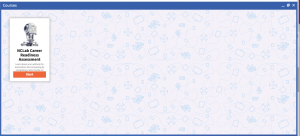
SIXTH: Click on it to begin doing your assessment. Enjoy!